
Traffic Case Records in Pinal County
Traffic tickets in Pinal County do not all land in one place. County and precinct matters go to a Pinal Justice Court. City citations go to a municipal or magistrate court. Maricopa, Casa Grande, Apache Junction, Florence, and Eloy each run their own. Six Justice Court precincts cover the rest of the county. So the agency name on paperwork matters less than the court block printed on the ticket itself.
The traffic file is a case record. Where it is public, it lists the alleged violation and citation number. It also shows the plea, appearance and hearing settings, court orders, disposition, money assessed, payments, and compliance events. The clerk of the assigned court controls copies. That office gives the official word on anything in the docket. A statewide index covers participating courts. It leaves out local ordinance charges, though, and only updates on a weekly cycle.
For the official statewide frame on responding to a traffic case, the Arizona Judicial Branch traffic-law resource sets it out.

That state guidance does not replace the issuing court's notice, deadline, or local instructions.
Pinal County Traffic Court Ownership
Start with the court printed on the citation. A county or precinct matter belongs to the named Pinal Justice Court. A city matter belongs to its municipal or magistrate clerk. Send a Maricopa city citation request to the Pinal County Clerk of the Superior Court and the search stalls. That Clerk does not hold the city's traffic file.
- Pinal Justice Court
- The clerk of that Justice Court keeps precinct traffic and qualifying misdemeanor matters.
- Municipal or Magistrate Court
- The city court clerk keeps city traffic, misdemeanor, and ordinance matters.
- Superior Court
- The Pinal County Clerk of Superior Court keeps limited-court appeals docketed there.
When an address or phone number is unclear, the Arizona Courts Locator is the safest current directory, since court counters and contact details can change.
Pinal County Traffic Ticket Lookups
Online Case Search gives you two ways into a participating court's docket. You can search by name or by case number. The name route asks for a Last or Business Name. An optional First Name is allowed, plus birth month and year selectors and a Court selector. The case-number route takes a two-letter prefix and the number. A local payment portal may offer a similar lookup. Just remember that a payment screen is not a full register of actions.
- Read the issuing court, citation number, and appearance date exactly as printed on the ticket.
- Use the named court's lookup or the Arizona Public Access Case Search for participating traffic matters.
- Search by citation or case number first. If needed, use the supported name and birth-date path.
- If the case is absent, call the named court, visit its counter, or follow the mail instructions printed by that court.
- For a formal public record, submit a Rule 123 request to the custodian of the issuing court.
Give the system a little time. A brand-new ticket often has not posted to the Pinal County docket yet. A weekly refresh can lag even older filings. A misspelled name, the wrong court, or a local ordinance charge will also come back empty. Is the date printed on your citation close? Do not sit around waiting for the online case lookup to catch up.
Pinal County Traffic Search Fields
Each Pinal County court runs its own vendor, so the search screens vary a bit. The fields themselves stay predictable, though. Type names and numbers exactly as they appear in print, punctuation included. Where a court selector is offered, use it. One name can sit in more than one court's docket. Birth date fields exist only to match you to the right case. Keep that data out of anything you share publicly.
| Field | Type | Requirement | Use |
|---|---|---|---|
| Citation or case number | Text | Usually one search key | Enter the prefix, number, and punctuation as printed |
| Defendant name | Text | Alternate | Use exact spelling |
| Date of birth | Date or selectors | Portal-dependent | Identity match only |
| Court | Selector | Sometimes | Choose the court printed on the citation |
| Search or payment | Button | Not applicable | A payment result may omit the full court history |
State Case Search shows a working traffic example, TR - 19010111. It also has a filter for cases with a vehicle-registration hold. Those tools help you find a case. The issuing court still holds the official record. Call the court, not the search screen, for the current hearing setting.
Traffic Court Dates in Pinal County
Start with the appearance date on the citation. That date controls everything at first, but it is not always a trial date. Sometimes it is just a deadline. You might respond, pay, enter a plea, or ask for a hearing. Later court notices and orders can move it. So the printed date may already be stale. Read the docket's event history in order and hunt for a newer entry. Look for one marked continued, reset, or vacated.
| Citation number | The printed identifier, including any local prefix and punctuation. |
|---|---|
| Court | The Justice, municipal, or magistrate court that owns the case. |
| Date and time | The response or hearing setting, subject to later orders. |
| Location or mode | The courtroom, counter, or approved remote designation when stated. |
| Status | Scheduled, reset, completed, disposed, or another court-entered state. |
Call the court listed on your ticket to confirm any setting. That matters most after a continuance or in the final days before the hearing. The statewide service refreshes every Friday. It only covers events through Wednesday, so a brand-new change can slip past the public index. For wider hearing help, check the Pinal County Court Schedule.
Pinal County Traffic Filing Channels
Looking up a ticket, paying it, and filing papers are three different tasks. Arizona eFileAZ handles filings only. It will not turn the payment page into a full traffic docket viewer. The statewide rollout table says all six Pinal Justice Courts accept electronic filings. These cover certain civil, eviction, and small-claims matters. The limited-jurisdiction eFileAZ availability page lists which courts and case types take electronic filings.
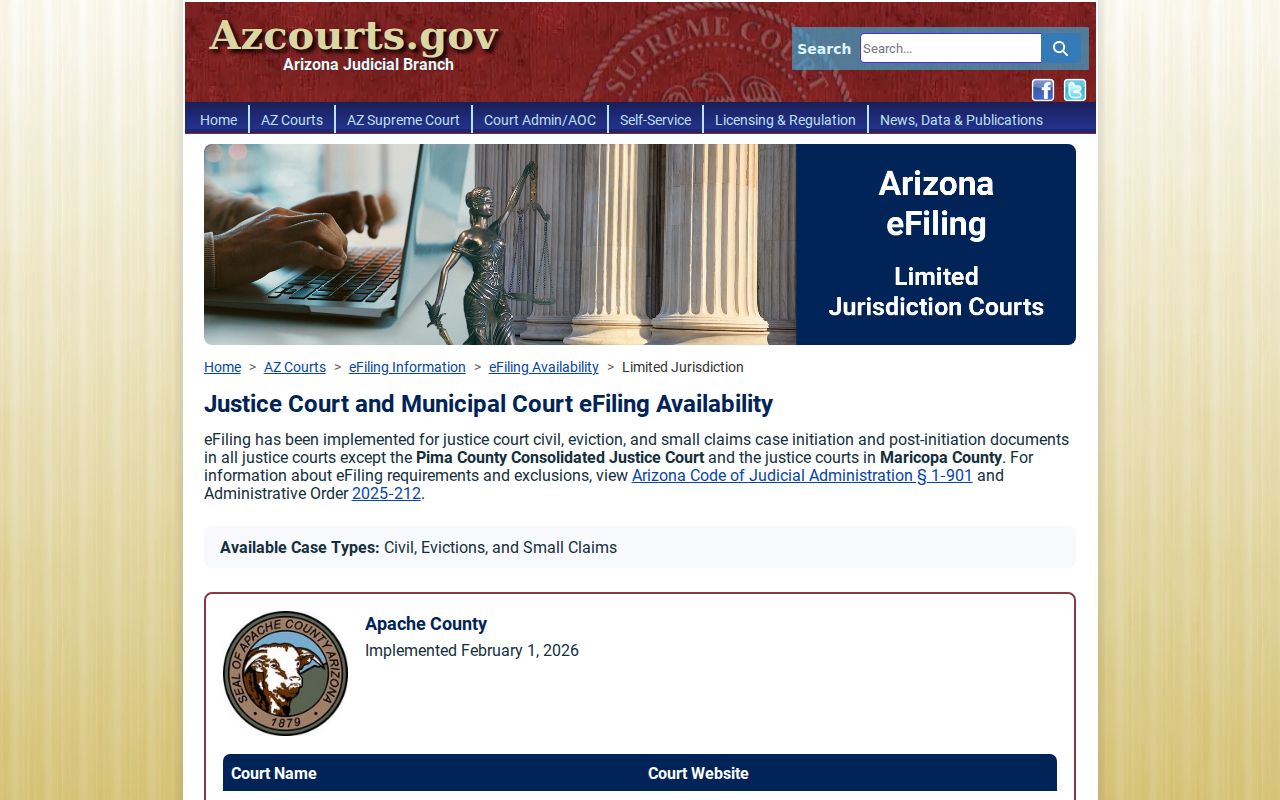
A court's spot on that table does not mean a traffic response can go through eFileAZ. Follow whatever traffic instructions the issuing court gives, exactly as written.
Paying a Ticket vs Fighting It
Paying a ticket usually ends it through the plea and result the court describes. Your money is not a deposit while the case stays open. To fight it, you enter the plea the court allows. Then file the request and show up as ordered. Either way, the citation or a later court notice sets the deadline that counts.
| Paying the ticket | Contesting the ticket |
|---|---|
| Accepts the court's stated payment disposition | Uses the court's process to enter the allowed plea or hearing request |
| Must be completed by the stated response date | Must be requested or entered by the stated response date |
| May be available online, by mail, or at the counter | May require a written filing or court appearance |
| Can foreclose a diversion option | Preserves the case for the court's hearing process |
Do not miss the response date: Failure to appear or comply can bring added court action, collection consequences, a warrant in a qualifying criminal matter, and a registration-renewal hold through the court and MVD process. Contact the issuing court to resolve the case.
Before you pay a Pinal County traffic ticket, ask the court about defensive driving or another lawful local resolution. Paying counts as resolving the case, and it can close the door on those options.
Pinal County Traffic Diversion Costs
Defensive driving in Arizona runs through the Judicial Branch and schools it certifies. State rules set the outer limits. You may use it for one eligible moving violation. You cannot have had another diversion dismissal within the prior twelve months, counted violation date to violation date. Cases involving death or serious injury do not qualify. Finish on time, too. Many local courts add their own rule. Some require completion at least seven days before the appearance date. The instructions on your citation control. The Arizona defensive driving program page lists the certified schools and explains that route.

Wait for the court's eligibility decision before you enroll. Do not assume from the charge title alone. The Pinal County defensive driving cost table breaks out the court, state, and surcharge components, and the school adds its own fee on top.
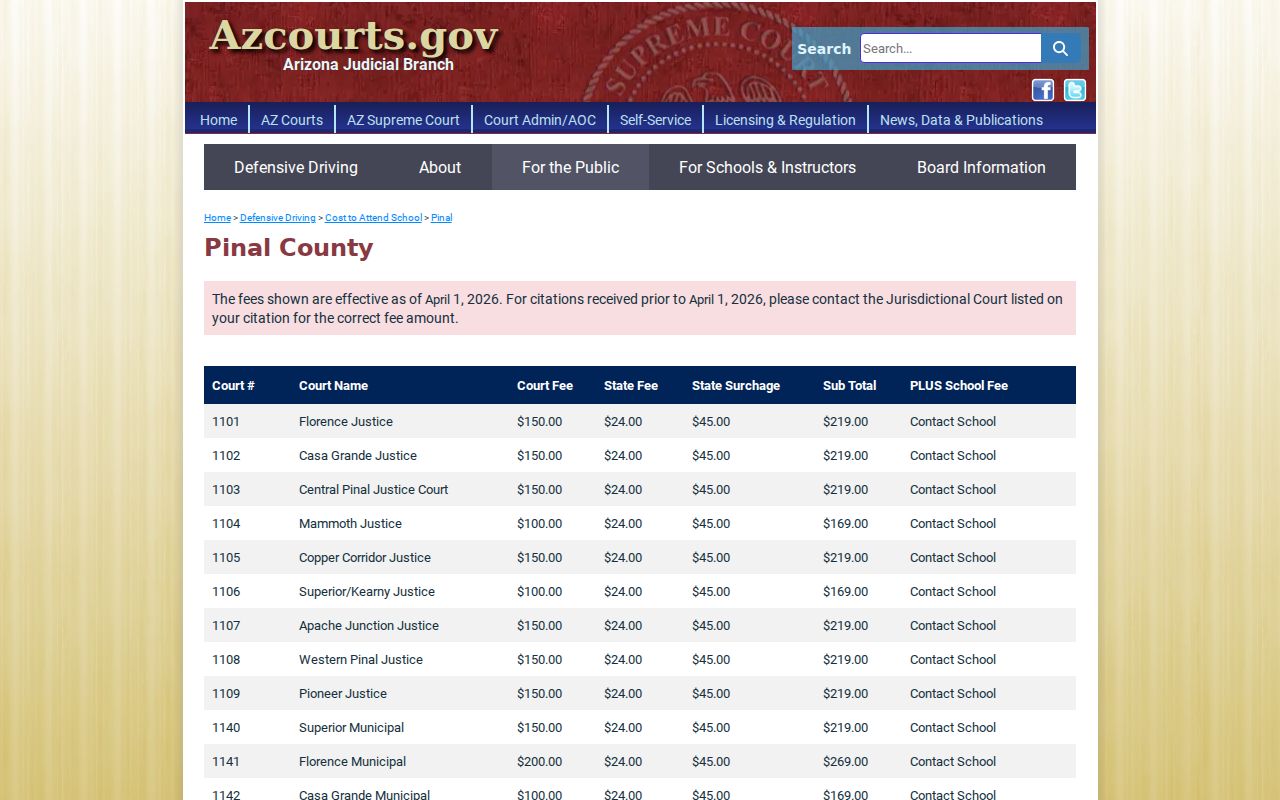
For dates effective April 1, 2026, the table shows $269 for Florence. Casa Grande and Eloy list $169. Maricopa and Apache Junction come in at $189. Check the live table and confirm the named court before enrolling.
Two Records: Court File and Driver File
A traffic ticket creates a court file, held by the court clerk. Arizona MVD keeps a separate driver file. It receives reportable court outcomes. The two files serve different purposes and sit with different offices. Knowing which is which sends your request to the right place the first time.
- Court case record
- The issuing Justice or municipal court clerk holds the citation, plea, settings, orders, disposition, and court obligations. Use the court lookup, phone, counter, mail, or Rule 123 request route.
- MVD driver file
- Arizona Motor Vehicle Division holds driver information and reportable state licensing or registration actions. Use MVD's own authorized record channel.
A court payment portal cannot hand you the MVD file. Nor does MVD hold the court's pleadings or docket. For a copy of the citation or a certified court disposition, contact the clerk named on the ticket.
Pinal County Traffic Appeals
A municipal traffic judgment can be appealed to Pinal Superior Court. For civil traffic, a Notice of Appeal generally must be filed within fourteen days. The municipal court then transmits the filed papers, plus audio or a transcript when required. Superior Court builds its appellate record under A.R.S. Sections 22-373 and 22-425. The review rests on that existing record and the law. It is not a new trial with fresh proof. Docket entries along the way may show the notice. They may also show record preparation and transmission, briefing, the decision, and the mandate. Further review is limited by A.R.S. Section 22-375. Anyone weighing an appeal should use the current court forms and rules. Do not rely on the payment portal.
Traffic Record Copy Fees
Copy prices depend on which court owns the traffic case. Superior Court posts its own copy amounts. The Justice Courts have adopted service figures of their own. Municipal courts may charge differently. Ask the issuing clerk for a quote. Say exactly what you need: the citation, docket history, disposition, an order, a plain copy, or a certified copy.
| Item | Amount | Scope |
|---|---|---|
| Superior Court plain copy | $0.50 per page | Not automatically a city or Justice Court fee |
| Superior Court certification | $35 per document | For a Superior Court record |
| Justice Court copied page | $0.50 per page | Under the researched county schedule |
| Justice Court certification | $33 | Consult the current schedule and named court |
| Justice Court records-location service | $33 | Consult the current schedule and named court |
A fine or assessment on a case is not a copy fee. Defensive driving costs also swing by court and school, so tie every amount to its source and purpose before you pay.
Confirm Pinal County Traffic Records
If the portal fails, work a simple chain. Check the citation for the exact court. Call that clerk. Visit the counter if needed, follow the court's mail instructions, and submit a formal Rule 123 request for a public court record. Have the citation number, your name, the approximate date, and the exact item sought ready. A blank statewide result does not cancel a deadline. Local ordinance charges are omitted from it. Participating-court data can lag, and each municipal clerk keeps its own file. What the court confirms directly should govern your response date and current case status. One caution about payments: a result may show an amount due. It may not display every docket event, filed paper, or later setting.